Why the edge of the sheet matters more than the centre
When a design sits too close to the edge, a printer can clip a line, crop a word, or shift a colour block into the trim zone. That is more likely when a sheet feeds a little unevenly, or when the artwork is set right up against the border with no safety space.
Printable sticker paper is made for clean output, but every printer has its own feed path and printable area. Inkjet and laser machines do not always place ink or toner in exactly the same position, so a design that looks fine on screen can end up touching the cut line in real life. A 2 mm or 3 mm safety margin often makes a real difference.
- Keep text away from the outer edge of each label.
- Leave a little room around logos, icons and fine borders.
- Use a test sheet before running a full batch.
How to set a safe margin for matte, gloss and clear sheets
Matte sticker paper is forgiving for home labels, pantry jars and school items because it shows less glare under kitchen lights or a Cape Town window. Gloss paper can look brighter, but tiny border mistakes show more clearly on a shiny finish. Clear sheets need even more care, because light areas and thin lines can disappear when the artwork sits too close to the edge.
Kraft sheets suit a more natural look, while vinyl sheets handle tougher use on containers, baskets and outdoor items. Each finish still needs a small buffer around the edge. If the design includes a background block, let that block extend beyond the final cut line, then keep the important parts inside the safe zone. That way a slight shift does not ruin the finished sticker.
- Matte: useful for writing space and neat indoor labels.
- Gloss: good for richer colour, but edge placement needs care.
- Clear: leave extra room around fine text and pale artwork.
- Kraft and vinyl: build in a margin before cutting.
When a sheet is set up properly, the design can fill the page without feeling cramped. The eye sees a full label, but the printer has a bit of breathing room too.
Inkjet and laser settings can change the margin result
Inkjet printing often lays down wet ink, so margins matter for more than just trim. If the artwork reaches too close to the edge, ink can pool there or smudge while the sheet is handled. Laser printing uses heat, which can also affect how the image sits near the border, especially on coated media that needs the correct printer setting.
Before printing, check the paper type setting on the machine and match it to the sticker sheet. That helps the printer place the image more accurately and can reduce curl or feed issues. If the sheet feeds a touch skew, a wide enough margin keeps the final sticker usable instead of half clipped. In Durban humidity, sheets stored out in the open can also pick up a little moisture, which makes edge drift more likely.
- Use the right paper setting for the printer type.
- Store sheets flat in a dry cupboard or drawer.
- Run a single test sheet before large print jobs.
A careful setup saves time later and reduces waste. It also makes it easier to repeat the same layout for labels, craft projects and seasonal gift tags.
Cut lines, crop marks and the space they need
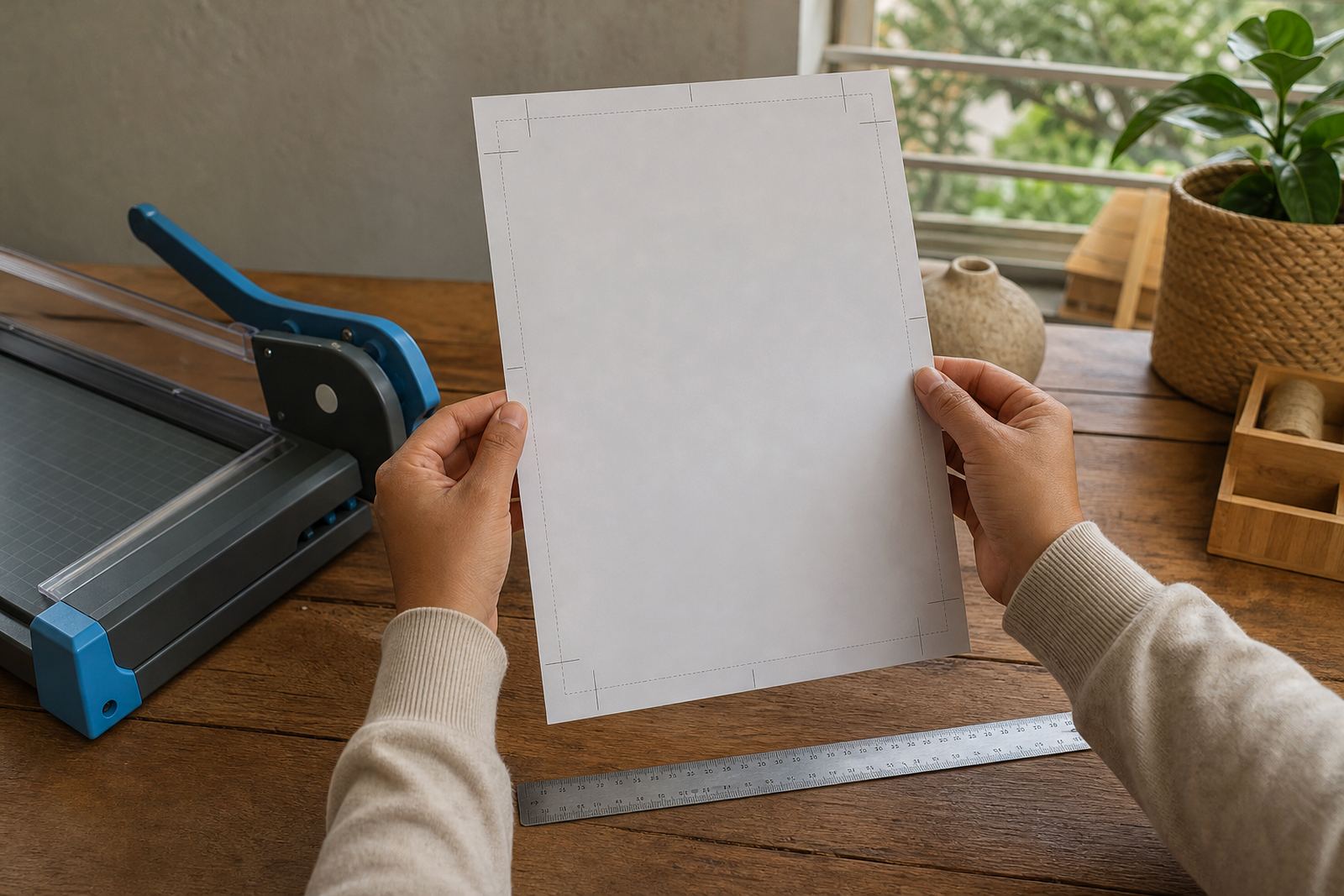
Cut marks help guide the final trim, but they should never sit too close to important artwork. If the line is almost touching the border, a hand cut or craft cutter can shave off more than intended. That is why safe margins are useful for both printed guides and the design itself.
For hand cutting, leave a little extra room around the outer edge so scissors can follow the line cleanly. For craft cutters, keep the cut path slightly outside the printed image if the paper and machine allow it. With clear and gloss sheets, a neat border looks better than a design pressed tight to the edge, especially on label sets that need a tidy finish.
- Place crop marks outside the final label shape.
- Keep corners and fine type away from the blade path.
- Check that repeated labels sit evenly across the sheet.
If a page contains several sticker sizes, margin checks become even more useful. One label might print perfectly while another sits too close to the edge because of the layout. A proper preview catches that before the sheet is wasted.
A Durbanville kitchen label job shows the value of a test print
A home organiser in Durbanville might print spice labels for glass jars, drawer tags and freezer notes all on one sheet. The artwork may look balanced on screen, but once the page feeds through the printer, the outer row can shift a little. If the text is sitting too close to the edge, the date or ingredient line can lose a letter.
A test print on plain paper helps show where the margins land before the sticker sheet is used. It also helps with colour, since a pale cream design can disappear on kraft or a bright red border can feel heavier than expected on gloss. Once the spacing is checked, the final sheet prints with less stress and less waste. In a busy household that matters, because nobody wants to reprint half a set after dinner prep has already started.
For this kind of job, the useful habit is plain: print one proof, hold it up to the light, and compare the outer spacing to the final cut line. Small checks save much bigger hassles later.
A short margin checklist before the sheet goes into the tray
Before you press print, it helps to move through the layout once more. The point is not perfection for its own sake, just enough control to stop the design from getting too close to the edge or the cutter path.
- Confirm the page size matches the sticker sheet.
- Check that the outer border is outside the final cut line.
- Leave room around every word, icon and logo.
- Use a test print if the design is new.
- Watch for any skew in the paper tray.
When stickers are stored for later use, keep them flat and away from damp cupboards or hot windows. A sheet that curls slightly can feed unevenly, which changes the margin result even if the artwork is correct. Good storage keeps the edges cleaner and the final cut easier to manage.
When margin checks help most in everyday making
Margin checks matter most when the work is detailed or repeated. Pantry labels, classroom sheets, gift tags, planner tabs and small product stickers all need the same kind of careful spacing. The more text or borders a design carries, the more helpful a safe edge becomes.
They also matter when switching between printer types or finishes. A layout that works on matte may need a slight adjustment on gloss, and a clear sheet usually needs a bit more breathing room than a bold white label. If the plan is to cut by hand, the margin should be generous enough to guide the scissors without squeezing the artwork. If a craft cutter is doing the work, the safe zone still protects the final edges from tiny machine shifts.
That is the real value of checking print margins. It keeps the layout practical, keeps the sheet useful, and gives the final sticker a neater finish without making the process harder.